



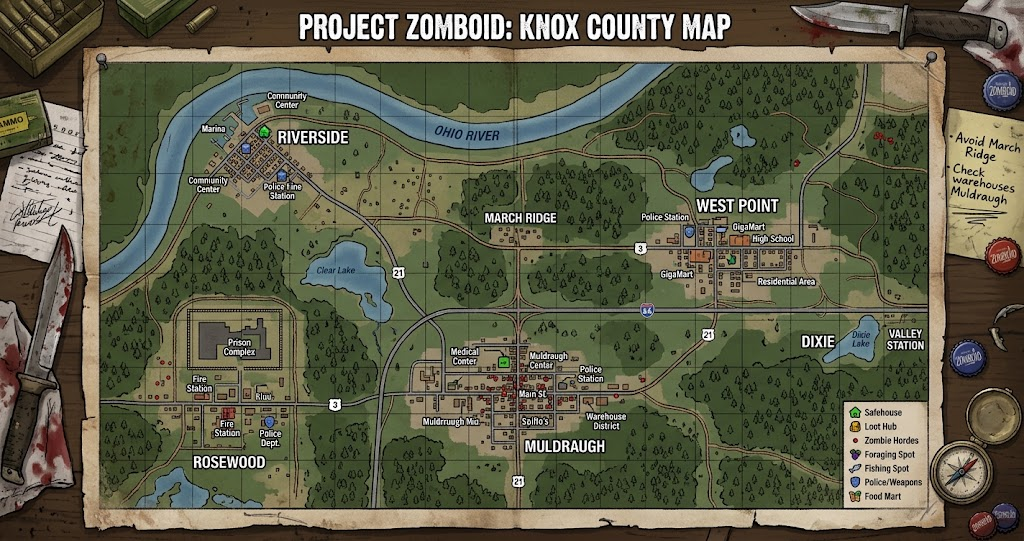
A successful run in Project Zomboid depends on more than finding food and avoiding zombies. Understanding the Project Zomboid map can help you choose a safer starting area, locate valuable supplies, and plan routes before entering dangerous neighborhoods. Whether you are a new survivor or an experienced player, knowing how Knox Country connects can make every journey more manageable.
This guide explains the main towns, useful landmarks, map tools, and navigation strategies that can help you explore the world with greater confidence.
What Is the Project Zomboid Map?
The Project Zomboid map represents Knox Country, a fictional region inspired by Kentucky. It contains towns, highways, rural properties, forests, industrial areas, and large urban neighborhoods. Each location offers different opportunities, but the risks also change depending on population density and available resources.
The world is not simply a collection of buildings. Roads connect important settlements, while smaller paths lead to farms, warehouses, cabins, and isolated properties. Therefore, learning the layout helps you travel with a purpose instead of wandering into unfamiliar areas.
Players often use an interactive Project Zomboid map alongside the in-game map. This makes it easier to identify locations, understand road connections, and plan longer trips.
Major Towns on the Project Zomboid Map
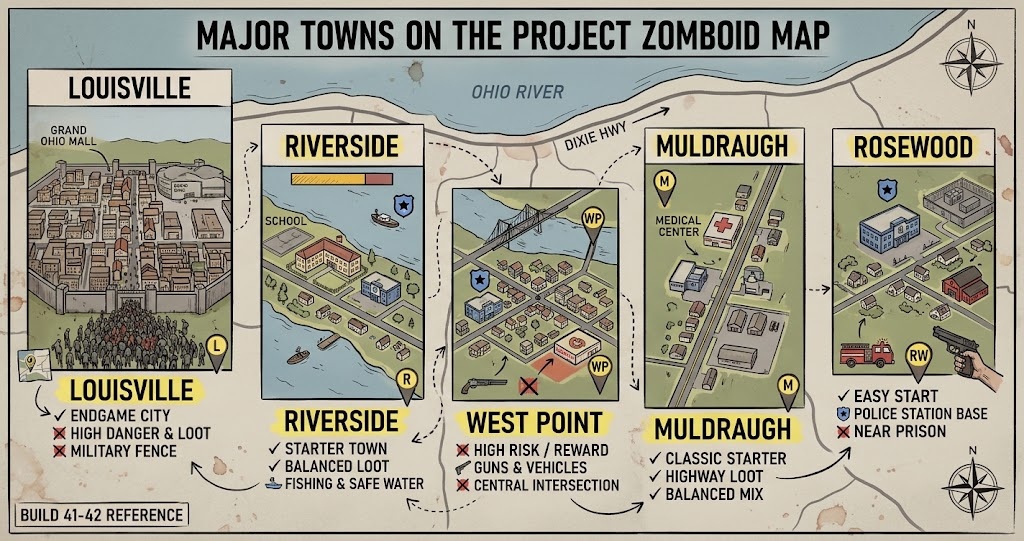
Knox Country includes several recognizable settlements. Each town has a different layout and survival potential. Your preferred location depends on whether you need easy access to supplies, quieter surroundings, or room to establish a long-term base.
Muldraugh
Muldraugh is a familiar starting location for many players. Its long main road connects commercial buildings, homes, and useful supply locations. You can find opportunities to search for tools, food, vehicles, and other survival equipment.
However, the town can become dangerous when zombies gather around busy areas. Players who choose Muldraugh should avoid unnecessary noise and consider securing a building away from heavily populated streets.
West Point
West Point offers a more challenging environment because its central areas can contain significant zombie activity. The town has useful shops, residential buildings, and access to important roads.
Experienced players may appreciate its supply opportunities. However, beginners should prepare an escape route before entering crowded commercial areas.
Riverside
Riverside is known for its river access and residential atmosphere. Its location can appeal to players who want a quieter base with opportunities for fishing and exploration.
The town still presents threats, especially around shops and busy streets. Even so, its layout can make it a practical choice for players who prefer a more controlled start.
Rosewood
Rosewood is another popular settlement, particularly for players who want to explore its residential and public buildings. Its fire station is a notable location because it can provide useful equipment, depending on the loot settings and game version.
The surrounding countryside also offers room to explore. However, players should remain careful when approaching major buildings because valuable locations can attract zombies.
Important Locations and Landmarks Across Knox Country
The Project Zomboid map becomes more useful when you understand what different areas can offer. A building’s appearance does not always reveal its value, so learning common location types can improve your decisions.
Residential neighborhoods are useful for searching kitchens, bedrooms, garages, and storage spaces. These buildings may contain food, clothing, basic tools, and household supplies. However, individual loot depends on the game’s settings and random distribution.
Warehouses and industrial properties are worth exploring when you need construction materials or tools. They can contain useful equipment, although large buildings may have multiple entrances and difficult interior spaces.
Gas stations are important because vehicles need fuel to support longer journeys. You may also find food and other supplies nearby. Before visiting, check the surrounding roads and parking areas for zombie activity.
Farms and isolated properties can provide more space for a secure base. Some locations also offer opportunities for gardening, storage, and vehicle parking. Nevertheless, remote areas can make supply runs longer, so consider the distance to nearby towns.
Project Zomboid Map Locations Compared
The following comparison highlights the general strengths and challenges of the main settlements.
| Location | General Character | Potential Benefits | Main Challenge |
|---|---|---|---|
| Muldraugh | Roadside town | Shops and useful buildings | Busy central areas |
| West Point | Dense settlement | Commercial supplies | High zombie danger |
| Riverside | Riverside community | Fishing and residential options | Loot availability varies |
| Rosewood | Smaller town | Useful public buildings | Dangerous hotspots |
| Louisville | Large urban area | Extensive exploration opportunities | Very high risk |
Louisville stands out because of its scale and dense urban environment. Meanwhile, smaller settlements may offer a more manageable starting experience. Your choice should match your character’s skills, equipment, and willingness to take risks.
How to Use an Interactive Project Zomboid Map
An interactive Project Zomboid map can make navigation easier because you can inspect locations without traveling across the entire game world. Many players use external map tools to identify towns, roads, buildings, and other landmarks.
Start by locating your current area or intended spawn town. Then inspect nearby roads and identify places that match your immediate needs. For example, a survivor looking for a vehicle might prioritize garages and parking areas, while someone building a base may focus on isolated homes.
Map information can also help you plan a route with fewer unnecessary stops. However, remember that an external map does not automatically show your current zombie population, character position, or every change in your save.
Practical Navigation Tips for Longer Survival Runs
Navigation becomes especially important when you travel beyond your starting town. Carry a usable in-game map when possible, and mark locations that you have already explored. This helps prevent repeated trips and makes it easier to remember where you found important supplies.
Also, avoid driving into unfamiliar neighborhoods without checking the road ahead. A blocked street or dense zombie group can turn a simple supply run into a dangerous escape. Keep enough fuel for your return journey, and avoid relying on a single route.
When exploring on foot, pay attention to landmarks such as road intersections, rivers, fences, and distinctive buildings. These features can help you maintain direction even when you do not have a clear view of the surrounding area.
You should also treat map information as a planning tool rather than a guarantee. Loot locations may not contain the same items in every world, and sandbox settings can change the experience considerably.
Common Mistakes When Exploring Knox Country
One common mistake is choosing a destination only because an online map marks it as valuable. A useful building can still be surrounded by zombies, making the journey more dangerous than the reward justifies.
Another problem is traveling too far without preparing supplies. Food, water, fuel, medical items, and a reliable escape route all matter during longer trips. Therefore, estimate the journey before leaving your base.
Some players also assume that every building will contain the same loot. Project Zomboid uses randomized loot distribution, so a location that helped during one playthrough may be disappointing in another. Adapt your plans to what you actually discover.
Conclusion
The Project Zomboid map is one of the most useful resources for understanding Knox Country and planning a longer survival run. From the quieter streets of Riverside to the dangerous urban areas of Louisville, every settlement offers different opportunities and challenges.
Use an interactive map to study roads, identify useful landmarks, and prepare supply runs before leaving your base. Most importantly, stay flexible because zombie activity and loot availability can change your plans. Explore carefully, mark useful discoveries, and build a survival strategy that fits your playstyle.
FAQs
Is there an official Project Zomboid map?
Project Zomboid includes an in-game map, while external interactive maps are created and maintained separately. These tools can help players explore Knox Country and identify locations. Check the map’s update information because community resources may differ from the current game version.
What is the best town to start in Project Zomboid?
Rosewood and Riverside can suit players who prefer a more manageable starting experience. Muldraugh offers useful roadside locations, while West Point presents a greater challenge. The best choice depends on your experience, character build, and preferred survival style.
Where is Louisville on the Project Zomboid map?
Louisville is a major urban area in the northern part of the expanded Knox Country world. It offers extensive buildings and exploration opportunities. However, its dense environment can make travel extremely dangerous, especially for survivors without strong equipment and a reliable vehicle.
Can I use an interactive Project Zomboid map while playing?
Yes. You can open a community map in a separate browser window or on another device while playing. It can help you identify roads and landmarks. However, remember that external maps may not reflect your save’s exact conditions or the current zombie population.
Does the Project Zomboid map change between playthroughs?
The main world layout remains recognizable, but individual survival conditions can vary. Loot distribution, sandbox settings, and other gameplay options influence what you encounter. Mods and game updates can also affect the experience, so check compatibility when using an external map.
For more updates visit: GAME ARENAX
