



Want to give your favorite fighters a fresh appearance or change the way Tekken 8 looks on your PC? Tekken 8 mods offer players ways to personalize character outfits, adjust visual details, and explore community-created changes beyond the game’s standard customization options.
However, installing unofficial files requires care. This guide explains the types of modifications players can find, where to look for community projects, how to approach installation, and what to consider before changing game files.
What Are Tekken 8 Mods?
Tekken 8 mods are unofficial modifications created by members of the PC gaming community. They can change selected game assets or presentation details without being part of the standard content released by Bandai Namco.
Most players explore these modifications for personalization. For example, a character mod might replace an outfit’s appearance, while a visual modification could adjust colors, effects, or other presentation elements.
Unlike official downloadable content, community modifications do not come with the same publisher support. Therefore, players should check compatibility and installation instructions before using them.
Popular Types of Tekken 8 Mods
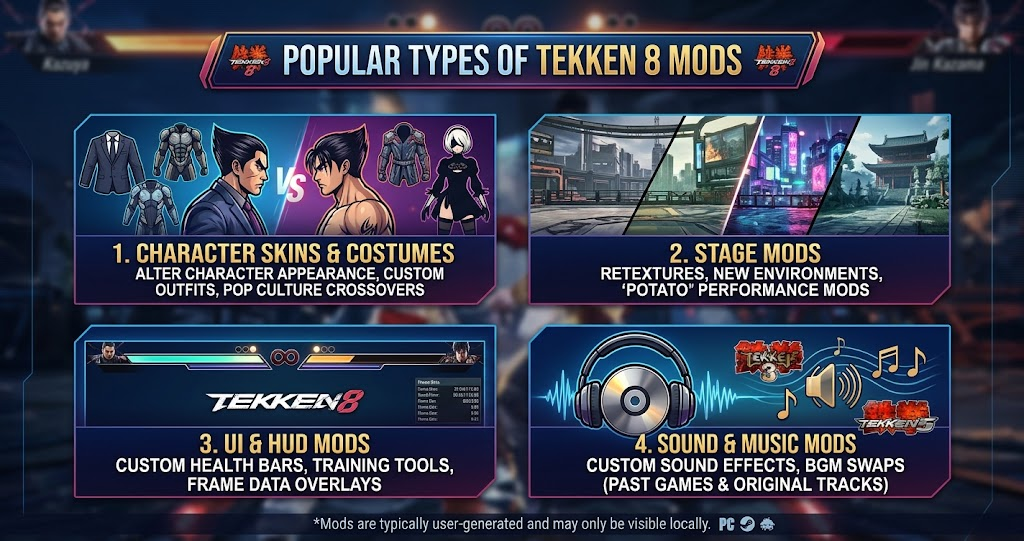
The modding community focuses on several areas of customization. Character appearance is especially popular because Tekken 8 features a large roster with recognizable fighting styles and visual designs.
Character and Outfit Mods
Character modifications can change clothing, hairstyles, accessories, and other visual details. Some creators produce alternative costumes, while others make designs inspired by different games, anime, or original concepts.
These changes appeal to players who want a different look for characters such as Jin Kazama, Kazuya Mishima, King, or Reina. However, the available options depend on the creator’s work and the game’s current version.
Graphics and Visual Mods
Visual modifications focus on how the game appears rather than changing its core fighting mechanics. Depending on the project, they may adjust lighting, colors, effects, or selected textures.
For example, a player might prefer a different visual style for screenshots or offline matches. Nevertheless, graphics changes can affect performance, so testing them individually is a sensible approach.
Custom Effects and Presentation Changes
Some community projects modify selected effects or presentation elements. These changes can make certain visual details feel different during gameplay.
Availability varies considerably. A modification that worked with an earlier game update may stop working after a patch, so always check its latest compatibility information.
Where to Find Tekken 8 PC Mods
Finding a trustworthy source matters as much as choosing an interesting modification. Community platforms such as Nexus Mods and GameBanana host user-created projects for various PC games, including fighting-game customization.
Before downloading anything, read the project description and check its update history. Comments from other users can also reveal whether a file works with the current game version or causes unexpected problems.
Pay attention to the creator’s installation instructions. Some projects require a particular folder structure, while others may depend on additional tools. Avoid downloads that hide their contents, demand unusual permissions, or ask you to run unrelated executable files.
It is also worth checking whether the creator has provided screenshots or gameplay previews. These give you a clearer idea of the modification before you install it.
Tekken 8 Mod Types Compared
Different modifications serve different purposes. The table below summarizes common categories and what players should consider before trying them.
| Mod Type | Main Purpose | Possible Benefit | Main Consideration |
|---|---|---|---|
| Outfit mods | Change character clothing | Fresh visual styles | Version compatibility |
| Character mods | Alter character appearance | More personalization | Model or texture conflicts |
| Graphics mods | Adjust visual presentation | Different image style | Performance impact |
| Effect mods | Change selected effects | Customized visuals | Update-related issues |
| UI modifications | Adjust interface elements | Different presentation | Interface compatibility |
The main takeaway is to choose a modification based on what you actually want to change. A simple outfit replacement may be easier to manage than a project that changes several visual systems.
How to Install Tekken 8 Mods on PC
Installation methods depend on the creator and the type of modification. Therefore, there is no single procedure that applies to every Tekken 8 project.
Start by checking the instructions supplied with the download. Confirm that the modification supports your installed game version and identify whether it requires a mod manager or manual file placement.
Before making changes, close the game and create a backup of any files that the instructions tell you to replace. This gives you a way to restore the original setup if the modification causes problems.
Next, follow the creator’s exact folder instructions. Do not rename files or move folders unless the documentation tells you to do so. Once installation is complete, launch the game and check the affected character or visual feature.
If the game crashes or displays missing textures, remove the newly installed files and restore your backup. You should also check for a newer version of the modification before trying again.
Are Tekken 8 Mods Safe to Use?
Mods are not automatically dangerous, but unofficial downloads can introduce security and compatibility risks. The safest approach is to use established community platforms and review each file before installing it.
Avoid suspicious installers, password-protected archives from unknown sources, and downloads that ask you to disable antivirus protection. A cosmetic modification should not need unrelated software or unnecessary access to your computer.
There is another important consideration: online play. A visual change that works in an offline environment may still conflict with game updates or online systems. Bandai Namco’s rules and support policies should guide decisions about unofficial modifications.
For that reason, do not assume every mod is approved for online use. Check the current official terms and avoid modifications that automate inputs, provide competitive advantages, or interfere with normal gameplay.
Do Tekken 8 Mods Affect Online Matches?
This depends on what a modification changes and how the game handles those files. A purely visual change may not affect combat, but that does not guarantee that it is permitted or safe during online play.
Gameplay-altering modifications deserve particular caution. Changes to hitboxes, attack behavior, movement, or other competitive systems could create unfair advantages and lead to problems with online services.
If you mainly want to experiment with custom appearances, keep your setup conservative and review the latest community guidance. When in doubt, use the standard game files for online matches.
How to Keep Mods Working After Game Updates
Tekken 8 updates can change files that community projects depend on. As a result, a modification that worked previously might cause visual glitches or stop loading after a patch.
Check the creator’s update notes before reinstalling an older file. If the project has not been updated, wait for confirmation from the creator or other users rather than forcing it into the latest version.
Keeping separate backups also makes troubleshooting easier. When several modifications are installed together, remove them one at a time to identify which file causes a conflict.
For a smoother experience, add only one new modification at a time and test the game before adding another. This approach makes problems easier to identify and helps preserve a stable installation.
Conclusion
Tekken 8 mods give PC players more ways to personalize character appearances, experiment with visual changes, and explore community-created content. Outfit replacements and graphics adjustments can refresh the experience, although compatibility and security should always come first.
Choose established sources, read installation instructions, and keep backups before changing game files. Most importantly, check current publisher guidance before using unofficial modifications online. Explore carefully and enjoy making your Tekken 8 experience your own.
FAQs
Are Tekken 8 mods available on PC?
Yes. PC players can find community-created modifications for character appearances, outfits, graphics, and selected visual effects. Availability depends on the creator and current game version. Always check the project’s instructions and compatibility details before downloading or installing a file.
Can I use Tekken 8 outfit mods online?
Do not assume that every outfit modification is permitted online. Compatibility and publisher policies can change, and unofficial files may cause problems. Review Bandai Namco’s current rules before using modifications with online features.
Do Tekken 8 mods change gameplay?
Most appearance-focused projects aim to change visual elements rather than fighting mechanics. However, some modifications may affect gameplay-related files. Check the creator’s description carefully so you understand exactly what the download changes.
Where can I download Tekken 8 mods?
Players commonly explore community modding platforms such as Nexus Mods and GameBanana. Check the creator’s reputation, comments, update history, and installation instructions. Avoid suspicious files or downloads that require unnecessary software.
Can a Tekken 8 update break installed mods?
Yes. Game updates can change files that modifications rely on, which may cause crashes, missing textures, or other issues. Check for compatibility updates after a patch, and keep backups so you can restore the original files when necessary.
For more updates visit: GAME ARENAX
