



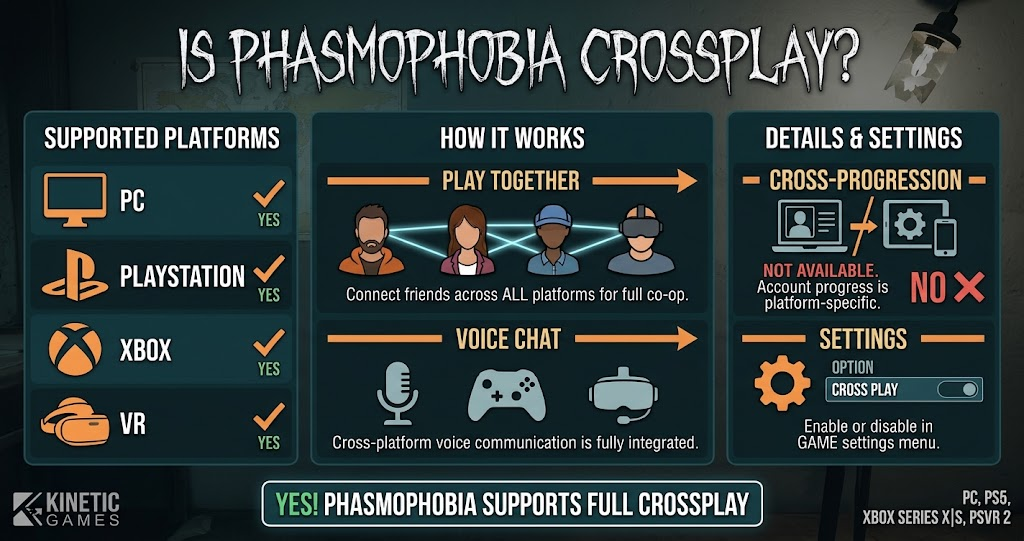
Want to investigate haunted locations with friends who own different gaming systems? You do not all need the same platform to play this supernatural horror game together. If you are asking, is Phasmophobia crossplay, the answer is yes. The game supports cross-platform multiplayer between PC, PlayStation 5, PS VR2, and Xbox Series X|S.
This guide explains which platforms can connect, how optional crossplay works, and what to check when a friend cannot join your investigation. You will also learn the difference between crossplay and cross-progression before choosing where to play.
Is Phasmophobia Crossplay Between PC and Consoles?
Yes, Phasmophobia supports crossplay between PC and supported console platforms. Players can investigate haunted locations together even when some use a computer and others play on PlayStation or Xbox.
Kinetic Games introduced optional crossplay with the console release. Its official Crimson Eye update announcement confirms that PC and console players can team up across PC, Xbox, and PlayStation. The feature allows friends to share investigations without buying the game on an identical system.
The supported console platforms include PlayStation 5, PlayStation VR2, and Xbox Series X|S. PC players can also join these sessions. Therefore, a group can combine different supported platforms and enjoy the same cooperative horror experience.
Crossplay is optional rather than mandatory. This gives players control over whether they want to connect with people using other systems. However, anyone planning a mixed-platform session should check the crossplay setting before creating a lobby.
Which Platforms Support Phasmophobia Crossplay?
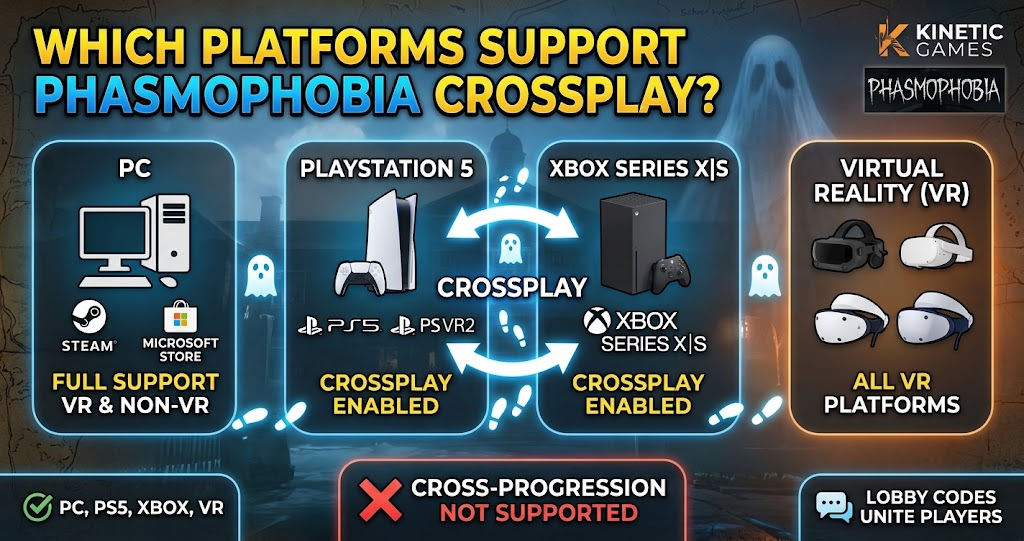
Phasmophobia crossplay connects its PC and current-generation console communities. The following table summarizes the supported platform combinations and explains where cross-platform play is available.
| Platform | PC | PS5 and PS VR2 | Xbox Series X|S |
|---|---|---|---|
| PC | Yes | Yes | Yes |
| PlayStation 5 | Yes | Yes | Yes |
| PS VR2 | Yes | Yes | Yes |
| Xbox Series X|S | Yes | Yes | Yes |
| PlayStation 4 | No version | No version | No |
| Xbox One | No version | No version | No |
The key point is that PC, PS5, PS VR2, and Xbox Series X|S belong to the supported crossplay group. However, Phasmophobia does not have PlayStation 4 or Xbox One versions, so owners of those older consoles cannot join through a native copy.
Can PC and Xbox Players Play Together?
Yes, PC and Xbox Series X|S players can join the same Phasmophobia multiplayer session. This means a friend using a gaming computer does not need to switch to an Xbox to investigate with console players.
The same cross-platform support applies when an Xbox player joins someone on PlayStation 5. As a result, your group can focus on choosing a map, gathering evidence, and identifying the ghost instead of worrying about matching hardware.
Does PS5 Support Crossplay With PC?
Yes, PlayStation 5 players can investigate with PC users. The console version supports cross-platform multiplayer, allowing friends to join the same cooperative session.
PS VR2 also belongs to the supported PlayStation platform family. Therefore, players using compatible VR and standard screen setups can take part in the same general multiplayer experience.
How to Enable Phasmophobia Crossplay
Because crossplay is optional, players should confirm that the setting is enabled before attempting to join friends on another platform. The exact menu layout can change with game updates, so check the current in-game settings rather than relying on an older screenshot or tutorial.
Open Phasmophobia and visit its settings menu. Look for the crossplay option and make sure it is switched on. If you want to play only with people using your own platform, you can turn the feature off instead.
Once the setting is correct, use the game’s multiplayer options to create or join a session. Follow the available in-game prompts to connect with your group. If the game provides a lobby code for your session, share it with your friends so they can enter the same room.
Everyone should also make sure the game has finished updating. Different game versions can cause connection problems, especially when one player has installed a new update while another has not.
What to Check When Phasmophobia Crossplay Is Not Working
Even when crossplay is supported, connection problems can interrupt a planned investigation. Fortunately, several basic checks can help you identify the issue before you assume the feature has stopped working.
First, confirm that crossplay is enabled for the players who need it. A disabled setting can prevent a mixed-platform group from connecting as expected. Next, check that everyone has installed the latest available game update.
Your internet connection can also affect multiplayer sessions. If one player experiences frequent disconnections or cannot enter a lobby, restarting the game and checking the network connection may help. Console players should also check whether their platform’s online multiplayer requirements are active.
Finally, confirm that everyone is following the current in-game joining process. Platform-specific friend systems do not always work identically, so use the multiplayer options provided by Phasmophobia rather than assuming every platform handles invitations in the same way.
Does Crossplay Work With VR Players?
Yes, VR players can join the wider Phasmophobia multiplayer experience. The game supports PS VR2 alongside its other supported platforms, while PC players can also use compatible VR equipment.
This flexibility makes mixed-device sessions possible. For example, one friend can investigate through a VR headset while another uses a standard monitor. Both can contribute to the investigation by gathering evidence and communicating with the team.
Phasmophobia Crossplay vs Cross-Progression
Crossplay and cross-progression describe two different features. Crossplay allows people using different platforms to play together. Cross-progression, meanwhile, allows a player’s saved progress to transfer between systems.
Having crossplay does not automatically mean a game supports cross-progression. A player might join a friend on another platform while keeping separate progress on each system.
Before purchasing Phasmophobia for a second platform, check the current official information about save transfers. Do not assume that your level, equipment, or other unlocks will automatically move between PC, PlayStation, and Xbox.
This distinction matters most for players who plan to change their main gaming device. Crossplay makes multiplayer easier, but it does not guarantee that your existing account progress follows you.
Is Phasmophobia Available on PS4 Xbox One, or Nintendo Switch
Phasmophobia’s supported console release covers PlayStation 5, PS VR2, and Xbox Series X|S. There is no native PlayStation 4 or Xbox One version in the confirmed platform lineup.
That limitation matters when arranging a session with friends. A player cannot join through an unsupported console simply because the rest of the group has crossplay enabled. They need access to a supported version of the game.
For Nintendo Switch players, check Kinetic Games’ latest announcements before making plans. Platform availability and crossplay support can change as development continues. An announced or planned release should not be treated as confirmed multiplayer compatibility until the developer provides those details.
Is Phasmophobia Crossplay Worth Using?
Crossplay makes Phasmophobia more convenient for groups that own different gaming systems. Instead of asking everyone to purchase the same hardware, friends can use supported PC and console versions to investigate together.
It also gives players more flexibility when arranging cooperative sessions. One person might prefer a PC setup, while another enjoys playing from a living room console. Crossplay brings those players into the same multiplayer community.
However, remember that the feature is optional. Players who prefer platform-specific matchmaking can disable it. For most groups with friends on different systems, keeping crossplay enabled is the practical choice.
Conclusion
So, is Phasmophobia crossplay? Yes. PC, PlayStation 5, PS VR2, and Xbox Series X|S players can team up through the game’s optional cross-platform multiplayer feature.
Before starting an investigation, make sure crossplay is enabled and everyone has the latest game version. These simple checks can help your group spend less time troubleshooting and more time finding paranormal evidence.
FAQs
Is Phasmophobia crossplay between PC and Xbox?
Yes. Phasmophobia supports crossplay between PC and Xbox Series X|S. Players can join the same cooperative investigation without owning the game on the same system. Make sure crossplay is enabled and follow the multiplayer joining options available in the game.
Can PS5 and Xbox players play Phasmophobia together?
Yes. PlayStation 5 and Xbox Series X|S players can play together through Phasmophobia’s cross-platform multiplayer feature. They can also join PC players in the same supported multiplayer community. Crossplay must remain enabled for players who want to connect across platforms.
Is Phasmophobia crossplay enabled by default?
Crossplay is an optional feature, so players should check its current setting before joining a mixed-platform group. If someone cannot connect with friends on another system, checking this option is a sensible first step. Also confirm that everyone has installed the same current game update.
Does Phasmophobia support cross-progression?
Crossplay and cross-progression are separate features. Crossplay lets players on different systems share a multiplayer session, but it does not automatically transfer saved progress. Check the latest official Kinetic Games information before switching platforms or purchasing another copy.
Can VR and non-VR players play together?
Yes. Phasmophobia supports VR and standard screen-based multiplayer experiences within its wider cooperative community. This allows friends with compatible VR equipment and players using regular PC or console setups to take part in investigations together.
For more updates visit: GAME ARENAX
