




Want to race through ridiculous obstacle courses with friends who use different gaming systems? Fall Guys cross platform support makes that possible, so you do not all need the same console or PC to enjoy the game together. The key is connecting through your Epic Games account and knowing how to invite your friends.
This guide explains which platforms support crossplay, how to create a party, how cross-progression works, and what to do if your friends cannot join your lobby.
Is Fall Guys Cross Platform?
Yes, Fall Guys supports cross-platform play, cross-platform parties, and cross-progression through an Epic Games account. Players can compete together across supported platforms instead of being restricted to people using the same device.
That means a friend playing on PlayStation can join someone on Xbox, while PC and Nintendo Switch players can also participate. The game focuses on accessible party-style competition, so crossplay makes it easier to organize matches with a mixed group of friends.
Fall Guys also supports mobile play in eligible regions. Android players can join players on PC and consoles, while iOS availability depends on regional support.
The important distinction is that crossplay connects players across platforms, whereas cross-progression allows compatible game progress to carry over when you switch devices using the same Epic Games account.
Which Platforms Support Fall Guys Crossplay?
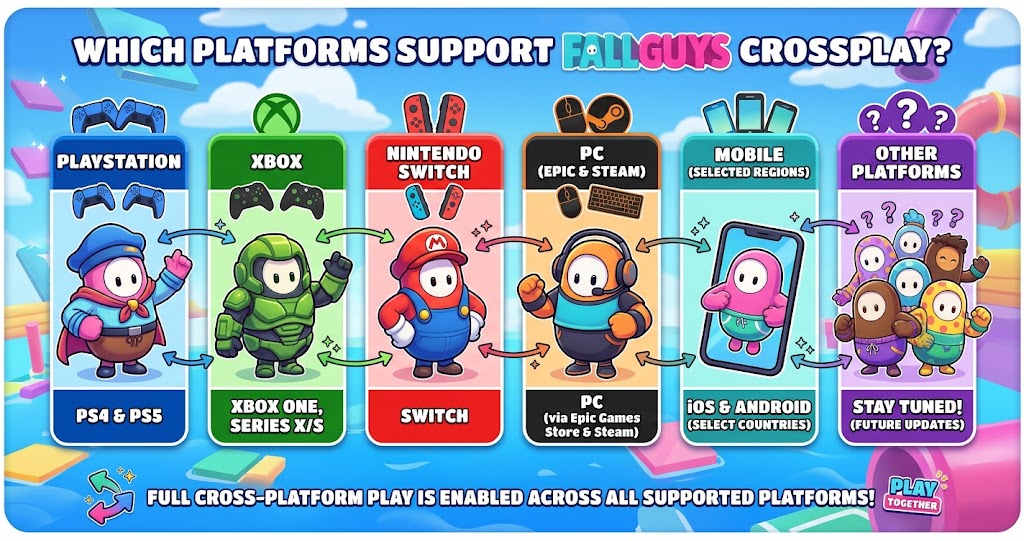
Fall Guys is available on several major gaming platforms. Its official website confirms crossplay and cross-platform parties, while Epic Games provides instructions for connecting with friends across supported systems.
The table below summarizes the main platforms and what players should know about joining friends.
| Platform | Crossplay Support | Important Detail |
|---|---|---|
| PlayStation 4 and 5 | Yes | Connect through Epic Games |
| Xbox One and Series X/S | Yes | Add friends using Epic IDs |
| PC | Yes | Epic Games Store and supported Steam installations |
| Nintendo Switch | Yes | Cross-platform parties are supported |
| Android | Yes | Available worldwide through the Epic Games Store |
| iOS | Yes, where available | Official availability is limited to the European Union |
These platforms let friends enjoy the same chaotic obstacle-course experience across different devices. However, mobile availability differs by region, so check the official Fall Guys information before planning a session with mobile players.
How to Play Fall Guys Cross Platform With Friends
Setting up crossplay is straightforward once everyone can access the game and their Epic Games accounts. You do not need to purchase the same console as your friends, and you can organize a session from the game’s main menu.
Step 1: Connect Your Epic Games Account
First, launch Fall Guys on your platform and follow any prompts to connect or sign in to your Epic Games account. Use the account you want associated with your game progress and friends list.
If you already have an account, make sure you sign in with the correct one. Using different accounts across devices can make it harder to find friends or access the progress you expect.
Step 2: Add Your Friends
Next, open the friends or social menu and look for the option to add a player. Enter your friend’s Epic Games display name rather than relying only on their console username.
According to the official support guide, players must add friends using their Epic Games display names before creating a cross-platform party.
Check the spelling carefully if the account does not appear. A small mistake in the display name can prevent the correct profile from showing up in the search results.
Step 3: Invite Friends to Your Party
Once you have added your friends, return to the main menu and open the party or player invitation interface. Select the people you want to invite and wait for them to accept.
After everyone joins, you can start a compatible playlist together. Fall Guys supports competitive rounds and cooperative challenges, giving groups different ways to enjoy the game.
Step 4 Start Playing Together
When your party is ready, choose an available game mode and begin matchmaking. Your friends can use their own supported devices while participating in the same session.
If an invitation fails, check your internet connection, account sign-in, game updates, and party settings. These simple checks often help identify the reason a cross-platform session will not start.
Fall Guys Cross Platform Settings and Matchmaking
Crossplay between friends is not the only useful feature. Fall Guys also offers a Cross-Platform Matchmaking setting that helps connect you with players using other platforms.
To check it, open the game settings, select Options, and scroll to the Gameplay section. Find Cross-Platform Matchmaking and switch it on if it is disabled. Epic Games recommends enabling this setting to help players find matches more easily.
This setting is particularly useful when matchmaking takes longer than expected. However, it is different from inviting a specific friend: matchmaking fills your game with available players, while party invitations let you choose who joins your group.
If queues remain slow, Epic also recommends checking the server region. Selecting your own region or using Automatic can help you find a suitable server. Choosing a distant region may increase latency, so changing regions is not always the best solution.
Does Fall Guys Support Cross-Progression?
Yes, Fall Guys supports cross-progression through an Epic Games account. This feature allows compatible progress and items to carry across supported platforms when your account is linked correctly.
For example, you may want to switch from playing on a console to playing on PC. With the same linked Epic account, you can access supported progression instead of treating each platform as a completely separate experience.
Cosmetics and progression are especially relevant because players often unlock costumes, nameplates, and other rewards while playing. However, if you already have separate profiles on multiple platforms, check Epic’s account-linking guidance before making changes. Choosing a primary profile can affect which content carries over.
Cross-progression also does not mean every platform-specific purchase or entitlement must transfer in exactly the same way. Review the official account support information if you have valuable items or multiple existing profiles.
Is Fall Guys Free to Play Across Platforms?
Fall Guys is free to play on its supported platforms, including PlayStation, Xbox, Nintendo Switch, and PC through the Epic Games Store. Epic’s official announcement also confirms crossplay and cross-progression across supported platforms.
That makes it easy for friends to join without purchasing separate copies of the game. You should still check the official store for your device to confirm current availability and download instructions.
Console players also do not need a paid online subscription specifically to play Fall Guys online. Epic Games confirms that subscriptions such as PlayStation Plus and Nintendo Switch Online are not required for this game.
Common Fall Guys Crossplay Problems and Fixes
Sometimes cross-platform play does not work as expected. Fortunately, a few basic checks can help you narrow down the problem without changing every setting.
If your friend does not appear in the social menu, verify that you are using the correct Epic Games display name. Also, confirm that both players are signed in to the intended accounts and can access online features.
If you cannot enter a match, check whether Cross-Platform Matchmaking is enabled. You can also restart the game, check for updates, and review the server region. These steps address common account, connection, and matchmaking issues described in Epic’s official support guidance.
When the problem continues, consult the official Fall Guys support page for current troubleshooting instructions. This is more reliable than following an old guide that may describe menus or account requirements that have since changed.
Conclusion
Fall Guys cross platform support makes it easy to enjoy obstacle-course chaos with friends on different gaming systems. By connecting your Epic Games account, adding friends through their display names, and inviting them to a party, you can play together without needing identical hardware.
Cross-progression also helps you carry compatible progress between supported devices. If you are ready to race with your friends, check your account settings, send an invitation, and jump into your next round of Fall Guys.
FAQs
Is Fall Guys cross platform between PC and PS5?
Yes, PC and PlayStation 5 players can play Fall Guys together. Both players should sign in with their Epic Games accounts, add each other using their Epic display names, and create a party. Once everyone joins successfully, you can enter compatible rounds together.
Can Xbox and Nintendo Switch players play Fall Guys together?
Yes, Fall Guys supports crossplay between Xbox and Nintendo Switch. You can invite friends through your Epic Games friends list rather than relying only on platform-specific friend lists. Make sure everyone has access to the game and can connect to online services before starting a session.
Can I turn off crossplay in Fall Guys?
Fall Guys has a Cross-Platform Matchmaking setting that you can enable or disable through the Gameplay options. Turning off cross-platform matchmaking can affect which players you encounter and may increase queue times. However, matchmaking preferences and cross-platform party invitations are different features, so check the current settings carefully.
Do I need an Epic Games account to play Fall Guys with friends?
Yes, an Epic Games account is required for cross-platform friends and parties. You can use your Epic display name to add players from other supported platforms. Linking the correct account also helps synchronize compatible progress and items when you switch between devices.
Does Fall Guys support cross-progression?
Yes, Fall Guys supports cross-progression through linked Epic Games accounts. Compatible progress and cosmetic items can carry between supported platforms. If you have existing profiles on different devices, review Epic’s account-linking instructions first, because selecting a primary profile can affect which content becomes available across your linked platforms.
For more updates visit: GAME ARENAX
