



Encountering hackers, cheaters, or players who ruin matches can make PUBG frustrating, especially when you’re trying to enjoy a competitive game. Fortunately, the PUBG report system gives players a way to flag suspicious behavior and help developers investigate violations.
Whether you play PUBG: Battlegrounds on PC or PUBG Mobile on your phone, understanding how to report players properly can help you submit a useful complaint. This guide explains how reporting works, what behavior you can report, and what to do if you encounter cheating or harassment.
How Does the PUBG Report System Work
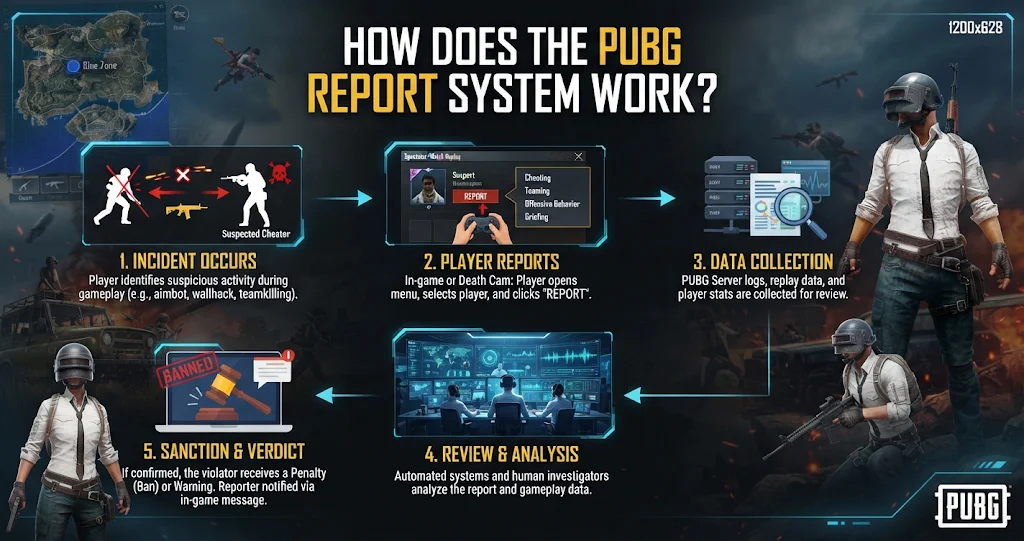
The PUBG report system allows players to notify the game’s developers about suspicious activity or inappropriate behavior. Reports help the moderation and anti-cheat teams review player activity and investigate potential violations of the game’s rules.
However, submitting a report does not automatically mean that another player will receive a ban. Developers may review gameplay evidence, account activity, and other information before taking action. Therefore, reporting should focus on genuine violations rather than personal disagreements.
In most cases, players can report suspicious opponents directly from the match result screen, replay interface, or other available in-game reporting options, depending on their platform and game version.
How to Submit a PUBG Report
Reporting directly through the game is generally the easiest method.
After finishing a match, check the results screen for the player reporting option. PUBG’s interface may vary between PC, console, and mobile versions, but the reporting feature generally allows players to select an opponent and identify the suspected violation.
When reporting someone, choose the reason that best describes the behavior you witnessed. For example, suspected cheating, offensive communication, teaming, or another rule violation may have separate reporting categories.
If the game provides an additional comment or evidence option, explain the incident briefly and accurately. A report that identifies suspicious actions is more useful than one based only on frustration after losing a match.
What Can You Report in PUBG
Players can report several types of behavior that violate PUBG’s rules. Although available categories can differ across game versions, the most common complaints involve cheating, abusive communication, and unfair gameplay.
The following table explains the types of incidents players may encounter and when reporting is appropriate.
| Report Type | Example of Behavior | Why It Matters |
|---|---|---|
| Cheating | Aimbot or suspicious tracking | Creates unfair advantages |
| Wallhacks | Tracking enemies through walls | Violates fair-play rules |
| Teaming | Collaborating with opponents in solo modes | Disrupts competitive integrity |
| Toxic behavior | Harassment or abusive messages | Makes matches unpleasant |
| Exploits | Abusing unintended game mechanics | Can unfairly affect matches |
| Account abuse | Certain prohibited account activities | Violates game rules |
These are examples of commonly reportable behavior, not a guarantee that every category appears in every PUBG version.
Reports should always reflect what you actually observed. For example, a player winning several fights does not automatically mean they are using cheats.
How to Report Hackers in PUBG
Reporting suspected hackers is one of the most important uses of the PUBG reporting system. Some cheating behaviors can be difficult to identify during a live match, so reviewing suspicious gameplay may help you understand what happened.
If an opponent repeatedly tracks your position without reasonable information, appears to hit impossible shots, or demonstrates suspicious movement, you can submit a report through the available in-game reporting interface.
Nevertheless, unusual gameplay alone does not always prove cheating. Skilled players can make accurate shots, anticipate enemy movement, and use sound cues effectively. Therefore, focus on repeated or clearly suspicious behavior instead of making assumptions.
PUBG’s anti-cheat systems and player reports may work together to identify prohibited activity. In addition, reporting helps provide information that developers may use when investigating accounts.
How to Report a PUBG Player Outside the Match
Sometimes the in-game reporting option may not be available, or you may need to provide additional evidence. In that situation, official PUBG Support can offer an alternative reporting route.
For PUBG: Battlegrounds on PC, the official support team recommends using the in-game reporting system first. If you cannot report through the game, you can submit a report through the PUBG Support website. Include the suspected player’s name, the date of the incident, the type of violation, and relevant screenshots or video evidence.
For PUBG Mobile, players can also use the Customer Service option in the game settings. When submitting a complaint, include the player’s character name or ID, explain the suspicious behavior, and provide a clear video link if available. Official PUBG Mobile reporting guidance recommends supplying evidence that helps the team investigate.
What Evidence Should You Include in a PUBG Report
Evidence can make a complaint more useful because it helps the support team understand the incident. A short gameplay recording showing suspicious actions is often more informative than a vague description.
For example, record the moment when an opponent tracks players through walls, repeatedly lands suspicious shots, or uses unusual movement. Include the match context when possible so the team can understand what happened before and after the suspicious action.
Additionally, provide the correct player nickname or ID. If you have the match date, approximate time, and relevant video footage, include those details in your report. Avoid editing footage in a way that removes important context.
How to Check Your PUBG Report Results
Players may want to know whether their complaint resulted in action. PUBG: Battlegrounds support states that players who report cheating through the in-game system can receive an in-game notification about the investigation result. Its support guidance also mentions a notification within 15 days for in-game reports, although investigation times and notification processes may change.
PUBG Mobile also provides a Security Zone feature in certain versions, where players can review report feedback and investigation results. However, the interface may differ depending on the current version and region.
If you do not receive an immediate response, avoid submitting repeated complaints about the same incident without new evidence. Instead, give the investigation time to process.
Conclusion
The PUBG report system is an important tool for dealing with hackers, abusive players, and other violations that damage competitive gameplay. Using the correct reporting option and providing clear evidence can help the game’s moderation teams investigate suspicious activity.
Whether you play PUBG: Battlegrounds or PUBG Mobile, report genuine violations instead of making unsupported accusations. If you encounter suspicious gameplay again, use the in-game reporting system or official support channels to submit your complaint and help maintain a fair gaming environment.
FAQs
How do I report a hacker in PUBG?
You can report a suspected hacker through the in-game reporting option, usually available on the match results screen or other player-related menus. Select the suspected player and choose the appropriate violation. If the option is unavailable, contact official PUBG Support with the player’s details and evidence.
Can I report a PUBG player after the match?
Yes, depending on the game version. PUBG Mobile provides reporting options through match results and certain Career or player profile interfaces. PUBG: Battlegrounds also supports reporting through its available in-game interfaces and official support channels.
Does reporting someone in PUBG guarantee a ban?
No. A report does not automatically result in a ban. Developers and moderation teams investigate reported behavior and determine whether the player violated the game’s rules. Penalties depend on the evidence and the severity of the violation.
How long does PUBG take to investigate reports?
Investigation times can vary. PUBG: Battlegrounds support guidance has previously stated that in-game reports may receive investigation-result notifications within 15 days. However, this is not a guarantee for every report or every version of the game.
Can I report someone for toxic behavior in PUBG Mobile?
Yes. PUBG Mobile allows players to report inappropriate messages and other prohibited behavior. Depending on the situation, you can also block the player to reduce unwanted communication and harassment.
For more updates visit: GAME ARENAX
