



Ready to jump into one of the most popular tactical shooters? A valorant download gives you access to a free-to-play 5v5 game built around precise gunplay, team strategy, unique Agents, and competitive matches.
The installation process is straightforward when you use the official source. This guide explains how to download Valorant, check whether your PC can run it, complete the installation, and avoid common problems that can delay your first match.
Valorant Download What You Need Before Installing
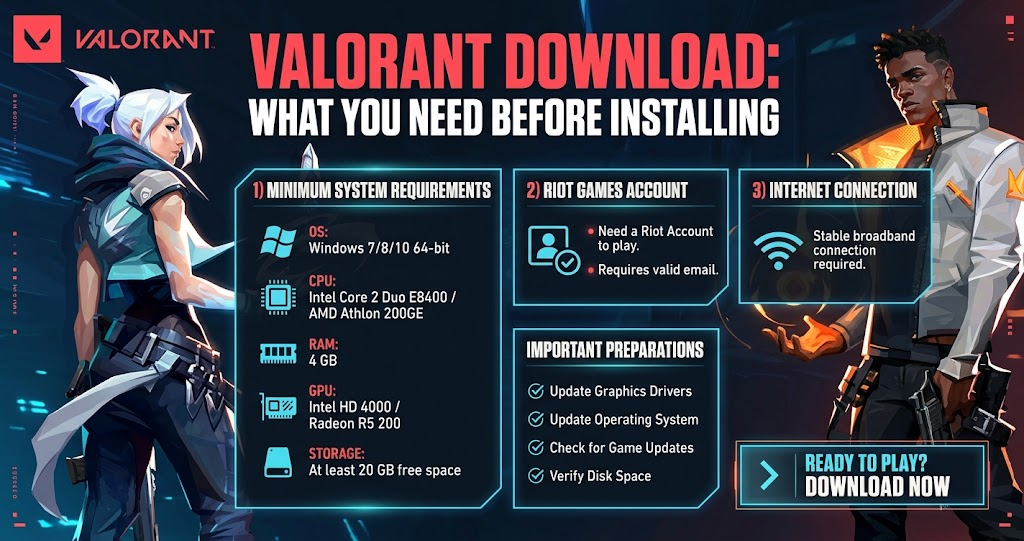
Before starting the Valorant PC download, make sure your computer meets the game’s current requirements. Riot Games lists Windows 10, build 19041 or newer, and Windows 11 64-bit as supported PC operating systems. The game also requires support for SSE 4.2 or AVX, at least 4GB of RAM, and 1GB of VRAM.
Windows 11 has an additional requirement. Riot specifies TPM 2.0 and UEFI Secure Boot for systems running Windows 11. Therefore, a computer that appears powerful enough can still encounter compatibility problems if these security features are disabled.
You should also have a stable internet connection and enough available storage for the game and its updates. Riot can change game files over time, so keeping additional free space available is a practical way to avoid installation or update issues.
How to Start a Valorant Download
The safest way to download Valorant is through Riot Games’ official website. Riot provides a dedicated download page where you can obtain the game client directly.
Start by visiting the official Valorant download page and selecting the download option. The installer will begin the setup process, allowing you to install the Riot software needed to access the game.
Avoid unofficial download websites whenever possible. Third-party pages can offer outdated installers, misleading advertisements, or files that are not provided by Riot. Using the official source gives you a much clearer path from downloading the installer to launching the game.
After downloading the installer, open it and follow the instructions shown on screen. Windows may ask you to confirm that you want to allow the installer to make changes to your computer. If the file came from the official Riot website, continue with the installation.
Valorant Installation and Riot Account Setup
A Riot account is required to log in and play Valorant. The official platform information states that players need a Riot account to access the game.
If you already have an account, sign in when prompted. New players can create an account during the setup process. Use an email address you can access because account verification and security-related communication may depend on it.
Once the Riot software is installed, the game client can continue downloading the required Valorant files. The exact installation process can vary slightly as Riot updates its launcher and game infrastructure.
Riot Vanguard is also part of the Valorant experience. It is Riot’s anti-cheat system, designed to help maintain competitive integrity. Because the anti-cheat software interacts with the system, some users may need to restart their computer during installation or after an update.
Valorant PC Download System Requirements
Checking your hardware before installing the game can save time. Riot’s current specifications separate hardware into minimum, recommended, and high-end categories based on expected performance targets.
| Requirement Level | CPU | GPU | Target Performance |
|---|---|---|---|
| Minimum | Intel i3-540 or AMD Athlon 200GE | Intel HD 4000 or Radeon R5 220 | 30 FPS |
| Recommended | Intel i3-4150 or Ryzen 3 1200 | GeForce GT 730 or Radeon R7 240 | 60 FPS |
| High-End | Intel i5-9400F or Ryzen 5 2600X | GTX 1050 Ti, Radeon R7 370, or Arc A310 | 144+ FPS |
| Memory | 4GB RAM | 1GB VRAM | Required baseline |
The main takeaway is that Valorant does not require a high-end gaming PC just to get started. However, stronger hardware can provide more consistent performance, especially if you want to play at higher frame rates.
A high refresh-rate monitor can also make a difference when your computer consistently produces higher frame rates. Competitive players often pay close attention to responsiveness, input latency, and stable performance because small timing differences can matter during fights.
What Happens After the Valorant Download?
After installation finishes, launch the Riot client and sign in to your account. Valorant may check for updates before allowing you to enter the game. This is normal because the live game receives regular changes, fixes, balance adjustments, and content updates.
Once the game is ready, you can explore the main menu and begin learning how matches work. Valorant combines traditional tactical shooting with Agent abilities. Each Agent has a specific set of abilities that can influence how your team attacks, defends, gathers information, or controls areas of the map.
The official game site describes Valorant as a 5v5 tactical shooter with unique Agents and several game modes, including Competitive, Unrated, Deathmatch, and Spike Rush.
That combination makes the game different from a traditional FPS. Winning usually requires more than accurate shooting. Communication, positioning, economy management, map knowledge, and ability usage all contribute to a successful round.
Valorant Download Tips for a Smoother Setup
A clean installation starts with your operating system. Make sure Windows is updated before installing the game, particularly if you are using Windows 11. This can reduce compatibility problems and ensure important system components are current.
It is also worth closing unnecessary applications during installation. Background downloads, software updates, and other demanding programs can slow the process or consume network bandwidth.
If the installation appears stuck, give the client some time before immediately canceling it. Game launchers sometimes need to verify files or download updates in the background. However, if nothing changes for an extended period, restarting the Riot client and checking your connection can be a sensible next step.
Security software can occasionally interfere with legitimate applications. Therefore, if Windows or your security software reports a problem, verify that you are using the official Riot installer before changing any security settings.
Valorant Download Problems and Easy Fixes
One common problem occurs when a PC does not meet the current system requirements. If your computer uses an unsupported Windows version, insufficient memory, or incompatible hardware, the game may not install or operate as expected. Checking Riot’s current specifications should be your first step.
Windows 11 users should pay particular attention to TPM 2.0 and UEFI Secure Boot. Riot specifically lists both as requirements for Windows 11. If either setting is unavailable or disabled, installation or launching can fail.
Connection problems can create another obstacle. If the client cannot download files, check whether other websites and online services work normally. Restarting your router can help with temporary connection issues, while switching from a congested wireless connection to a more stable connection may improve the download.
When the Riot client repeatedly fails to update, restarting the computer can also help. After rebooting, open the client again and allow it to check the installation. If the problem continues, Riot’s official support resources are the best place to check for current troubleshooting instructions.
Is Valorant Free to Download?
Yes, Valorant is a free-to-play game. You do not need to purchase the base game before downloading it. Riot’s official site promotes Valorant as a free game and provides the download through its own platform.
However, free access to the game does not mean every optional item is free. Valorant includes cosmetic content and other optional purchases. These do not change the basic process of downloading and starting the game.
For new players, the most important requirement is a Riot account and a compatible system. Once those pieces are in place, you can install the game and begin playing without buying the base title.
Can You Download Valorant on Console?
Valorant is no longer limited to PC in every supported region. Riot has expanded the game to PlayStation 5 and Xbox Series X|S, although availability can depend on region and platform rollout. Riot’s official platform information lists PC, Xbox Series X|S, and PlayStation 5 as supported platforms.
Console and PC versions are designed around competitive integrity. Riot has explained that console players do not play against PC players, while Xbox and PlayStation players can play together.
For someone specifically searching for a Valorant PC download, the Windows version remains the relevant option. Console players should instead check the appropriate digital storefront for their supported platform and region.
Why Download Valorant From the Official Source?
The official download route is the most reliable choice because it gives you the current Riot installer rather than an unknown third-party package. It also reduces the risk of downloading modified, outdated, or misleading files.
Official sources are especially important for competitive online games because the launcher, game files, security components, and updates need to work together. A third-party installer may not provide the same experience.
Riot’s official site also provides current game information, system specifications, news, and updates. For example, Riot continues to publish game updates that can change Agents, weapons, settings, performance, and other parts of the experience.
What to Do After Installing Valorant
Your first few matches are a good opportunity to learn rather than focus only on winning. Valorant rewards careful movement, accurate shooting, and communication, so understanding the fundamentals can make the game much easier.
Start by learning how your chosen Agent’s abilities work and how those abilities interact with your team. Meanwhile, practice basic crosshair placement and avoid moving unnecessarily while taking important shots.
You should also become familiar with the economy system. Buying weapons and abilities at the right time can influence an entire round, so spending every credit immediately is not always the best decision.
As you gain experience, experiment with different Agents and roles. Some players enjoy aggressive entry-focused characters, while others prefer gathering information, supporting teammates,
Conclusion
A valorant download is easy to complete when you use Riot Games’ official source and prepare your PC first. Check the Windows version, hardware requirements, internet connection, and Windows 11 security requirements before starting the installation.
Once Valorant is installed, take time to learn its Agents, maps, weapons, economy, and tactical systems. The game is free to play, but its competitive depth gives you plenty to master as you improve. controlling areas, or defending important positions.
FAQs
Where can I download Valorant?
You should download Valorant from Riot Games’ official website. Riot provides a dedicated download page for the game, which gives you the appropriate installer and the safest route into the Riot client. Avoid unofficial download sites because they may distribute outdated or modified files.
Is Valorant free to download on PC?
Yes. Valorant is free to download and play on PC. You need a compatible Windows computer and a Riot account, but you do not need to purchase the base game before starting. Optional cosmetic content can be purchased separately, but it is not required to play.
What are the minimum Valorant PC requirements?
Riot currently lists Windows 10 build 19041 or newer or Windows 11 64-bit, 4GB of RAM, 1GB of VRAM, and a processor supporting SSE 4.2 or AVX. Riot also lists specific minimum graphics and processor hardware for its 30 FPS target.
Does Valorant work on Windows 11?
Yes, Valorant supports Windows 11 64-bit. However, Riot requires TPM 2.0 and UEFI Secure Boot on Windows 11 systems. If those security features are disabled, you may encounter problems when trying to run the game.
Can I play Valorant on PS5 or Xbox?
Valorant is available on PlayStation 5 and Xbox Series X|S in supported regions. Riot says console players can play together across Xbox and PlayStation, while console players do not enter matches with PC players. Availability can vary by region.
For more updates visit: GAME ARENAX
